Short answer
nx2android ports your own Switch games to Android natively, with no emulator: the game’s arm64 code runs on the phone, and the Switch’s services and graphics are stood in for on Vulkan. It is by shirai91, is the Android port of nxnative, and runs on a Windows PC, where it builds an APK from your own game files and prod.keys. The latest release is v0.1.3 (29 October 2026). The README lists 23 games as playing, mostly at 60 fps, on Adreno or Xclipse GPUs only (not Mali or PowerVR).
The repository was created on 24 October 2026 and the first release followed on 27 October; by 31 October it had about 460 GitHub stars. Each supported game is handled on its own, and a game that isn’t on the list does not work yet.
This site is not affiliated with the developer, with Nintendo or with any of the game publishers.
What it is
- A per-game native runtime: the tool takes the game’s own arm64 program, links it for Android, and pairs it with a host that implements the Switch’s system services and replays NVN graphics through Vulkan. It reuses nxnative’s work, under the same MIT licence.
- A porting tool, not an app store: you run
nx2android.exeon Windows, it decrypts your game files with your keys as Switch emulators do, and it writes an APK and a data folder. It can install them on a phone connected with USB debugging. - What’s in the download: the README says the repository and releases contain no keys, no game files and nothing extracted from them, and the tool never downloads either. The APK and data built on your PC do contain the game, so they are for your own use.
Which games?
The README’s list on 31 October 2026, tested on a Lenovo Legion Y700 (Snapdragon 8 Elite, Adreno 830):
| Game | Notes |
|---|---|
| Super Mario Odyssey | 60 fps; shake the device to throw Cappy |
| Super Mario Bros. Wonder | 60 fps, dips to 40 |
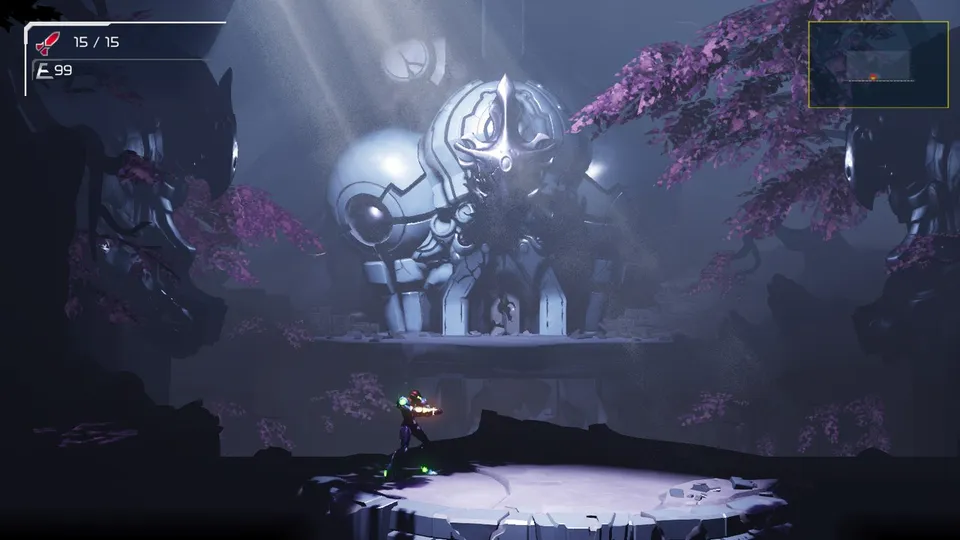
| Metroid Dread | 60 fps |
| Pokémon Legends: Arceus | 60 fps (30 on Switch) |
| Paper Mario: The Origami King | 60 fps (30 on Switch) |
| Paper Mario: The Thousand-Year Door | 60 fps; work in progress, lighting flickers |
| Xenoblade Chronicles 3 | 30 fps; work in progress, some effects and models missing |
| Donkey Kong Country Returns HD, Captain Toad, Mario vs. Donkey Kong, Advance Wars 1+2 | 60 fps |
| Hollow Knight: Silksong, Hades II, Celeste, Blasphemous 2 | 60 fps |
| Castlevania: Belmont’s Curse, 13 Sentinels, Unicorn Overlord (boots only so far) | 60 fps |
| Tales of Eternia Remastered, NEO: The World Ends with You, Graveyard Keeper 2, Unpacking, Viractal | Playable |
Each game is tagged with the nx2android version it was last tested on. Several, including Super Mario Odyssey, Metroid Dread, Pokémon Legends: Arceus and both Paper Mario games, are tagged v0.2.0, newer than the latest release, which the README says means they arrive with the next release. Each game also needs a specific update version, listed in the README.
On 31 October 2026 the tracker had 14 open issues. We didn’t try it ourselves.
What you need
- Your own Switch games: NSP, XCI, NSZ or XCZ files (base game, update, DLC), and prod.keys, both dumped from your own Switch. We don’t explain how to obtain game files or keys.
- A Windows x64 PC for the tool, with room for the about 1 GB of Android build tools it downloads from Google and Microsoft.
- An Android phone or tablet with an Adreno or Xclipse GPU. Mali and PowerVR GPUs, common in MediaTek, Exynos (before Xclipse) and Google Tensor phones, can’t read the game’s BC-compressed textures.
How it works for players (overview)
From the README, at a high level: download the zip from the official Releases page, unzip it and start nx2android.exe. On the Setup tab, download the missing tools and set your keys; on the Port tab, choose the folder with your game files and click Port. Tick the install option with the phone plugged in, or copy the APK and data folder yourself. Port again after each new release to get its fixes.
How it relates to other Switch ports
- nxnative: the same approach on iPhone and iPad, which nx2android is ported from.
- LumaNX: a Mac app that packages Switch games through nxnative.
- Persona 5 Royal on Android: a separate one-game Android port that runs the Switch game natively without a PC.
Is it official, and will it stay up?
- No, it is an unofficial project, not affiliated with or endorsed by Nintendo or the other publishers.
- We found no takedown when we checked on 31 October 2026. The README notes that Nintendo’s takedown notices so far went to whoever hosts a project, such as Switch emulator repositories on GitHub, so it may not stay up.
- Get it only from shirai91/nx2android. Ready-made APKs of these games shared elsewhere contain the games and are not from the project.
Not working?
Check that your game and update versions match the README’s list, and that your phone has an Adreno or Xclipse GPU. Report problems on the repository’s issue tracker. For single-game native ports, see the recompiled games list.
FAQ
What is nx2android?
A free Windows tool by shirai91 that ports your own Nintendo Switch games to Android, natively, one supported game at a time. It is the Android counterpart of nxnative, which does the same on iPhone and iPad. You pick the game's folder, click Port, and get an APK plus a data folder for your phone.
Is it an emulator?
No. Switch games are arm64 code, like Android phones, so the game's own code runs directly on the device. A host stands in for the Switch's system services, and the game's NVN graphics are replayed on Vulkan.
Which games work?
The README lists 23 games as playing on Android, among them Super Mario Odyssey, Metroid Dread, Super Mario Bros. Wonder, Pokémon Legends Arceus, Hollow Knight Silksong, Hades II and Celeste. A game that is not in the list is not supported yet. Some, such as Xenoblade Chronicles 3 and Paper Mario The Thousand-Year Door, are marked work in progress.
Which phones can run the ports?
The device's GPU must read BC-compressed textures, which in practice means Qualcomm Adreno or Samsung Xclipse, not Mali or PowerVR. The developer tests on a Lenovo Legion Y700 with a Snapdragon 8 Elite.
What do I need?
A Windows x64 PC, your own Switch game files (NSP, XCI, NSZ or XCZ, with update and DLC if you have them) and prod.keys from your own Switch. The tool downloads the Android NDK, .NET SDK and platform-tools, about 1 GB, from Google and Microsoft. We don't explain how to obtain game files or keys.
Unofficial. This page is written by an independent directory. It is not made by, endorsed by or affiliated with Nintendo and others or shirai91 (nx2android (Switch games ported to Android natively, one game at a time)'s author). We do not host any files, and we never link to game files, ROMs or ISOs.
Sources
This page was last updated on Nov 5, 2026. A date after a source is the day we read it. Versions and steps follow the official project; if they differ, the official source wins.
- shirai91/nx2android README (games table, tested device, steps, keys and game files, licence; checked 31 October 2026)
- nx2android releases (v0.1.0 on 27 Oct 2026 to v0.1.3 on 29 Oct 2026)
- v0.1.3 release notes (nine more games, NSZ and XCZ support)
- nx2android issues (checked 31 October 2026)
- seedds/nxnative, the iPhone and iPad project nx2android is the Android port of
More ports
See every native PC version of a console game in our recompiled games list, browse all PC ports of console games, or go back to the full list of ported games.