Short answer (checked 23 October 2026)
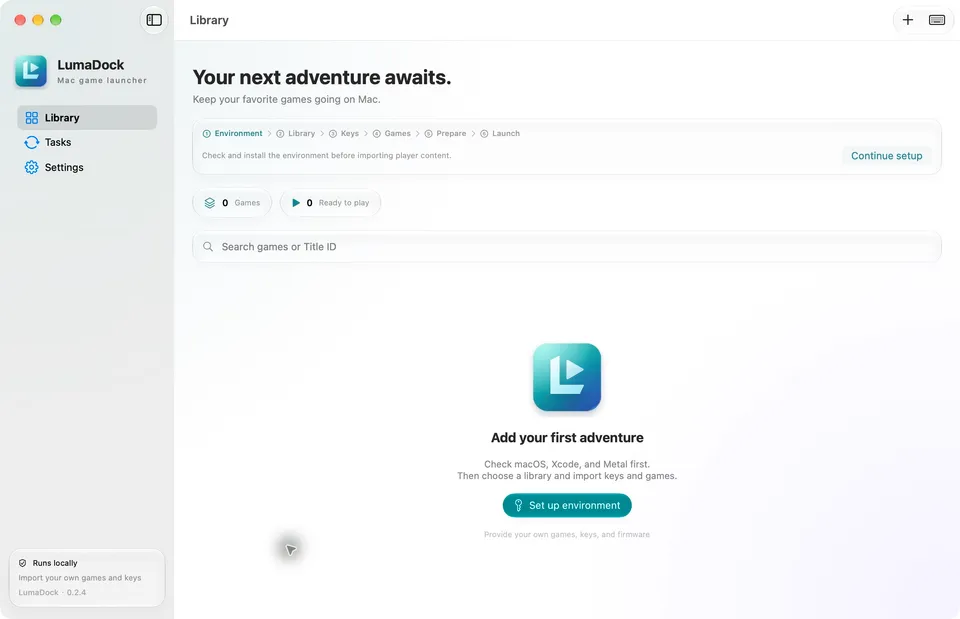
LumaDock is a Mac launcher that runs your own Switch games natively on Apple silicon through the nxnative engine. It is a free, MIT-licensed app by Xc1Ym (Xc1Ym/LumaDock), first released on 20 October 2026. You bring your own NSP files, prod.keys and a copy of nxnative. You need macOS 26 with full Xcode. It can also export an unsigned iPhone/iPad IPA. No engine, games or keys are included.
This site is not affiliated with LumaDock, nxnative or Nintendo. We link only the official repositories and never point to game files, keys or ready-made apps.
What it is
LumaDock is a SwiftUI app for Apple silicon Macs. It does not run games by itself. It drives nxnative, an MIT-licensed project by seedds that runs Switch games on Apple hardware without an emulator. nxnative is normally used from the command line. LumaDock wraps it in a game library with setup checks, progress bars, error diagnostics and input mapping.
nxnative’s README describes how it works. The Switch and Apple chips are both ARM64, so the game’s own code runs directly; a rewriter changes the few instructions Apple’s systems do not allow. A host stands in for Horizon, the Switch’s operating system, and the Switch’s NVN graphics are rebuilt on Metal. Shaders go through the Ryujinx shader translator (MIT) and SPIRV-Cross. Each supported game has its own profile and fixes, so it is a set of game-specific ports rather than a general emulator.
Which games?
LumaDock supports what the nxnative copy you choose supports. On 23 October 2026 the nxnative README listed 48 games tested on an iPhone. They include Super Mario Bros. Wonder, Super Mario Odyssey, Breath of the Wild, Tears of the Kingdom, Metroid Dread, Fire Emblem Engage, Animal Crossing: New Horizons, Pokémon Legends: Z-A, Monster Hunter Rise, Hades, Hollow Knight: Silksong and Celeste. Other games get a best-effort build that may not start.
Tested through LumaDock is a much shorter list. The author’s validation record covers Super Mario Odyssey 1.4.1, played on an M5 Pro Mac with macOS 27.0.1, and Breath of the Wild 1.9.0, imported with its update and DLC and built on the Mac. The record says later engine updates were not re-checked in full play, and that macOS 26 itself was not re-tested on real hardware.
What you need
- Your own game files: the base game as NSP, plus its update and DLC if you have them, and prod.keys from your own Switch. The app’s empty library also asks for firmware. We do not explain how to dump or obtain files.
- The nxnative source: since version 0.2.5 LumaDock no longer bundles or downloads nxnative. You point it at a copy you got yourself from the official repository, and LumaDock works on a private copy without changing yours.
- A Mac: Apple silicon on macOS 26 or newer, with full Xcode (not just the command line tools) and the Metal toolchain. The first engine-tool build also needs the .NET 10 SDK for macOS Arm64. Python and the other runtime tools are bundled.
- For iPhone and iPad: Xcode’s iOS platform, XcodeGen (
brew install xcodegen) and your own signing or sideloading tool. nxnative’s games need iOS/iPadOS 26 on an iPhone 15 Pro or newer or an M1 iPad or newer, because older iPhones can’t read the games’ BC-compressed textures.
How it works in practice
The README describes the steps. You download the ARM64 DMG from the GitHub releases, check it against SHA256SUMS and drag the app into Applications. The builds are ad-hoc signed and not notarized, so macOS warns the first time. A setup assistant checks the environment, asks for your nxnative folder and builds the engine tools. Then you choose a library folder, import your prod.keys and add the game’s NSPs; LumaDock matches base game, updates and DLC from their metadata. Prepare builds the game’s code, shaders and runtime files on your Mac, and Launch game starts it. Generate IPA… makes an unsigned iPhone/iPad package instead.
The README warns that a successful build doesn’t guarantee the game is fully playable, and suggests backing up saves before upgrades.
Is it official, and will it stay up?
- LumaDock and nxnative are unofficial fan projects, not affiliated with or endorsed by Nintendo. Both say their repositories contain no game content. The finished build on your Mac contains the game built from your own files.
- Bait check: the LumaDock repository is new (created 20 October 2026), but the author’s GitHub account dates from 2017 and has 65 public repositories. The Swift and Python source is in the repository, and releases include a source ZIP next to the DMG. Users were already filing issues, among them a language bug in Breath of the Wild. nxnative was created on 13 October 2026 and had about 2,200 stars and nearly 300 commits by 23 October.
- Takedowns: we found none. GitHub’s public DMCA archive had no notice naming LumaDock or nxnative on 23 October 2026. Nintendo filed two notices there on 1 October 2026 against Ryujinx and Yuzu copies. These projects need prod.keys and reuse Ryujinx code, so they are exposed.
- Get it only from the official repository. Sites offering ready-made Mac apps or IPAs with a game inside are not the project.
How it relates to MacNativeGames
MacNativeGames and nxnative are separate projects with a shared ancestor. Both started from the generic parts of D2R Mobile, the Diablo II: Resurrected port that first ran a Switch game natively on Apple chips. MacNativeGames says its one-script packaging follows nxnative’s approach. LumaDock uses nxnative, not MacNativeGames, and credits both MacNativeGames and D2R Mobile for upstream contributions.
So there are now two ways to run Tears of the Kingdom on Apple hardware. MacNativeGames supports versions 1.0.0, 1.2.1 and 1.4.3 and builds a Mac app or an IPA from its own script; it lists iPhone 14 or newer. nxnative (and so LumaDock) was tested on version 1.4.3, builds other versions without testing them, and needs an iPhone 15 Pro or newer.
Was it made with AI?
Neither project says so in its README, and we found no AI co-author lines in their recent commits. nxnative keeps an AGENTS.md and a docs/agents folder of notes written for AI coding agents, which suggests AI help, but how much isn’t stated.
Related
- nxnative: the engine LumaDock drives, which packs your Switch games into iPhone and iPad apps (48 tested).
- Zelda: Tears of the Kingdom on Mac and iPhone and Breath of the Wild on Mac: the MacNativeGames ports.
- Mario Kart 8 Deluxe on iPhone and Mac and Diablo II: Resurrected on iPhone: other Switch games run natively on Apple chips.
- More Apple-device ports: iPhone and Mac ports.
FAQ
What is LumaDock?
A free, MIT-licensed Mac app by the developer Xc1Ym that gives the nxnative engine a game library and a graphical workflow. You import your own Switch NSP files and prod.keys, LumaDock prepares the game, and you launch it natively on an Apple silicon Mac or export an unsigned iPhone/iPad IPA.
Is LumaDock a Switch emulator?
No. It is a launcher for nxnative, which runs the Switch game's own ARM64 code directly on the Apple chip and rebuilds the Switch graphics on Metal, with settings and fixes written for each supported game. LumaDock itself contains no engine.
Which games work with LumaDock?
The games nxnative supports. The nxnative README lists 48 games tested on an iPhone, from Super Mario Odyssey and Breath of the Wild to Tears of the Kingdom and Pokémon Legends Z-A. The LumaDock author's own test record covers only Super Mario Odyssey 1.4.1 (played) and Breath of the Wild 1.9.0 on a Mac.
What do I need?
An Apple silicon Mac on macOS 26 or newer with full Xcode and Metal, the .NET 10 SDK for the first engine-tool build, a local copy of the nxnative source, and your own game as NSP files plus prod.keys. We do not explain how to get game files or keys.
Can I put the games on my iPhone?
LumaDock can export an unsigned IPA, which you sign and install with your own sideloading tool. That needs Xcode's iOS platform and XcodeGen. The LumaDock author says iPhone and iPad compatibility has not been validated; nxnative itself needs iOS 26 on an iPhone 15 Pro or newer, or an M1 iPad.
How is it related to MacNativeGames?
They are separate projects. MacNativeGames is a Tears of the Kingdom and Breath of the Wild port with its own engine; nxnative is a multi-game engine; both grew from the same D2R Mobile code. LumaDock uses nxnative and thanks MacNativeGames and D2R Mobile for upstream contributions.
Unofficial. This page is written by an independent directory. It is not made by, endorsed by or affiliated with Nintendo and others or Xc1Ym (LumaDock (Switch games on Mac with the nxnative engine)'s author). We do not host any files, and we never link to game files, ROMs or ISOs.
Sources
Facts on this page were checked against these official sources on Oct 26, 2026. Versions and steps follow the official project; if they differ, the official source wins.
- Xc1Ym/LumaDock README (requirements, setup, IPA export, acknowledgements; checked 2026-10-23)
- LumaDock 0.2.6 release notes (external nxnative engine, IPA export, ad-hoc signed DMG)
- LumaDock validation record: Super Mario Odyssey 1.4.1 and Breath of the Wild 1.9.0 tested on an M5 Pro, macOS 27.0.1
- GitHub API: LumaDock created 2026-10-20, MIT, about 170 stars, 13 commits by one author, v0.2.0 on 2026-10-20, v0.2.6 on 2026-10-22 (checked 2026-10-23)
- seedds/nxnative README (46 Switch games tested on iPhone, iOS 26, iPhone 15 Pro or newer; MIT; checked 2026-10-23)
- nxnative developer docs (how it works, running games on the Mac, per-game notes)
- GitHub DMCA archive, October 2026 (no notice naming LumaDock or nxnative as of 23 October 2026)
More ports
See every native PC version of a console game in our recompiled games list, browse all PC ports of console games, or go back to the full list of ported games.