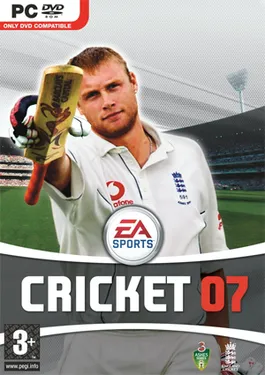
Cricket 07 in the browser is a fan-made port of EA Sports Cricket 07 (2006) by Dhaiwat Pandya, played at cricket07.dhaiwat.com. It runs in a desktop browser tab with no install and no files to import: the site downloads the game itself, about 740 MB before your first match and about 1.2 GB in total. You can play offline against the computer, with controllers on one computer, or with controllers on one computer. Online 1v1 has shut down: on 11 November 2026 the site said multiplayer was closed because of server costs. It is unofficial and Electronic Arts is not involved. Because it is a commercial game, we only link to it and do not embed it.
How to start
- Open cricket07.dhaiwat.com in Chrome or Edge on a desktop or laptop.
- On the first visit, choose Regular or Lite:
- Regular: the whole game with commentary and the full soundtrack. About 740 MB downloads before you can play; the intro movies, about 320 MB more, follow in the background.
- Lite: no commentary and only one song, about 440 MB. You can upgrade to the full game later from the same page.
- Wait for the download bar to finish. The page asks the browser to keep the files, so later visits start without downloading again.
- Pick Play Solo (offline, against the computer or with controllers on this computer). Play Multiplayer is greyed out since the online mode shut down (checked 11 November 2026).
- Press Alt + Enter (Option + Enter on a Mac) or the corner button for fullscreen.
The download resumes where it stopped if the tab closes. If your browser does not have enough free storage, the page says how much it needs.
What browser you need
- Chrome or Edge, recent versions, on Windows, macOS, Linux or ChromeOS. The game draws with WebGPU and stores its files in the browser’s private file storage (OPFS); the page checks both before it starts.
- The page itself also names Safari. We have not tried it.
- Firefox only turns on WebGPU for some graphics cards and drivers, and the page warns you if it finds none. Use Chrome or Edge instead.
- A real graphics card or integrated GPU. Remote Desktop sessions and virtual machines usually have no GPU for the browser and fail at the WebGPU check. Some older Intel graphics (an HD Graphics 4400 report on Windows 10) also fail to start WebGPU.
- About 1.2 GB of free disk space for the full game.
- A keyboard or a game controller. The mouse moves the in-game cursor.
Controls
| Action | Keyboard |
|---|---|
| Move, aim a shot, place the ball | Arrow keys |
| Select, normal shot, stock delivery | S |
| Back | W |
| Lofted shot | Hold Shift |
| Advanced shot, take a run | D |
| Cancel a run | A |
| Special deliveries | A, D, Shift, Alt |
| Pause | Esc |
| Fullscreen | Alt + Enter |
The page shows this list next to the game on wide screens. Controllers work too and are numbered in the order you connect them.
Saves and the 1.2 GB download
Everything is kept in the browser’s storage for cricket07.dhaiwat.com: the game files, your profiles, tours, tournaments and saved matches. The page asks the browser to treat it as persistent storage, and Chrome usually grants that once you use or bookmark the site.
That storage is easy to lose:
- Clearing browsing data or cookies for the site deletes your saves and the game, and the next visit downloads it again.
- A private or incognito window forgets everything when it closes.
- If the disk runs low, the browser may free the space itself.
When we checked on 23 October 2026, the site had no button to export or back up saves. The only backup option we found is the separate desktop app below, which backs up saves automatically. Saves made in an online match are kept apart and do not touch your solo saves.
How to play online with a friend
Online play has shut down. When we checked on 11 November 2026, the Play Multiplayer card was greyed out and the page said “Multiplayer has shut down because of server costs”. The steps below describe how it worked when we checked on 23 October 2026, in case the author brings it back.
Online play was 1v1 over the internet, with each player on their own computer.
- Both players open cricket07.dhaiwat.com and choose Play Multiplayer, then type a name.
- The host picks a server location and clicks Create room. The choices are Nearest to me, Western or Eastern Europe, Eastern or Western North America, South America, Asia-Pacific, Northeast Asia, Southeast Asia and Oceania. For friends in different countries, the page suggests a server between you.
- The host sends the room code, or uses Copy invite link.
- The friend enters the code under Join a game.
- The host sets the input delay and clicks Start match.
Input delay: Auto picks the lowest delay your connection allows. You can also set 2 to 18 frames (33 to 300 ms). The page says 2 or 3 frames only work for players in the same city or country; higher values are smoother on a poor connection.
Things to know:
- Both players need the full game downloaded. If you chose Lite, or the background download is not finished, the page shows how much is left and lets you play solo meanwhile.
- Each player needs a keyboard or a controller.
- Both games run the same simulation and only the controller inputs travel between you. If anything drifts out of sync, the game notices.
Does it work on phones and tablets?
No, not as a normal phone game. The page has no touch controls; it expects a keyboard or a controller. On top of that the game needs WebGPU, about 1.2 GB of storage and more memory than most phone browsers allow a single tab. A tablet with a keyboard or controller might get further, but we have not tested it and the author does not list it. Use a desktop or laptop.
Is there a Mac version?
There are two Mac options, and neither is an official download from Dhaiwat.
- Build it yourself (native). The cricket07-browser repository compiles the same translated code into a native Mac app with clang, as well as the browser version. It needs a Mac with Apple Silicon, Ghidra, Python, SDL2 and wgpu-native, and the game files from your own copy. There is no ready-made Mac download.
- Cricket 07 for Mac and Windows (third-party app). Made by Udesh Kumar, source at udeshvirk/cricket07-desktop. It is an Electron app that loads Dhaiwat’s website and downloads the game from his server on first launch, then plays offline. It adds real player names for 394 players, widescreen, HD textures and automatic save backups, with builds for Apple-chip Macs, Intel Macs and Windows 10/11. It has no online play. The app is not signed, so macOS and Windows show security warnings when you first open it. Its author asked Dhaiwat for his blessing in issue #1 on 21 October 2026, and there was no reply when we checked. We have not tested it.
On a Mac, the website in Chrome is the simplest way to play.
How it was made
Dhaiwat translated the game’s Windows executable from x86 machine code to C, one function at a time: 31,547 functions, about 1.3 million instructions, found with Ghidra and converted by his own translator. The C is compiled to WebAssembly with Emscripten.
The game still expects Windows, so a host layer stands in for it: Direct3D 8 is rebuilt on WebGPU, DirectSound plays through Web Audio, and DirectInput reads the keyboard, mouse and gamepads. Each translated function is tested against the original in a CPU emulator. Online play uses deterministic lockstep, adapted from an earlier browser port of Rugby 06, which also brought the controller support (credited to Stephan Cilliers).
The repository was created on 16 October 2026 and is MIT-licensed. It contains no game files and no game code. The website, though, serves the game files itself, which is why the repository’s “bring your own copy” line does not apply to playing on the site. The commit history credits Claude, Anthropic’s AI model, as a co-author.
Not working?
- “This browser has no WebGPU”: switch to a current Chrome or Edge.
- “WebGPU is switched on … but it found no usable graphics adapter”: turn on hardware acceleration in browser settings, update your graphics driver, and do not play over Remote Desktop or in a virtual machine. Some players see this after the game glitches and they reload; closing the browser fully and reopening it is worth a try.
- “Not enough browser storage”: free some disk space. Chrome gives each site a share of the free space.
- Keys or the mouse get stuck after switching windows: a known bug with a fix proposed on GitHub. Click back into the game, and reload the page if that does not help.
- The download keeps restarting: clearing site data deletes partial downloads too. Leave the tab open until the bar finishes.
- If the site is down, the closest browser sports game we track is PES 6 in the browser, which needs no files and has touch controls.
This page is not affiliated with Dhaiwat Pandya, Udesh Kumar or Electronic Arts. We do not link any source for game files.
FAQ
Is Cricket 07 in the browser free?
Yes. cricket07.dhaiwat.com costs nothing, needs no account and shows no ads. The only thing on the page besides the game is a note from the author saying he is open to job offers.
Is cricket07.dhaiwat.com safe?
Nothing is installed. The page loads its own scripts and Google Fonts, then downloads the game files into your browser's private storage. We saw no ads, trackers, pop-ups or download buttons when we read the page on 23 October 2026. The game code is built from a public MIT-licensed repository. Stick to the real address, cricket07.dhaiwat.com, and ignore look-alike sites.
Is Cricket 07 in the browser official?
No. It is a fan project by Dhaiwat Pandya, and Electronic Arts is not involved. The repository says you should bring your own copy of the game, but the website downloads the game files for you, so it is serving EA's copyrighted data without any stated permission. It could be taken down.
Does Cricket 07 browser work on mobile?
Not in practice. There are no touch controls, so you need a keyboard or a game controller, and the game needs WebGPU, about 1.2 GB of storage and a lot of memory. Use a desktop or laptop with Chrome or Edge.
Can I still play Cricket 07 online with friends?
No. When we checked on 11 November 2026, the Play Multiplayer option on cricket07.dhaiwat.com was greyed out with the note "Multiplayer has shut down because of server costs". Solo play against the computer, and local matches with controllers on one computer, still work.
Can I play with two players on one computer?
Yes. Play Solo covers offline matches against the computer and local matches with controllers plugged into the same machine.
Is there a Cricket 07 app for Mac?
Not from Dhaiwat. His repository can build a native Mac app, but only if you build it yourself from your own copy of the game. A separate fan app, Cricket 07 for Mac and Windows by Udesh Kumar, wraps the website, plays offline and backs up saves, but has no online play. It is unsigned and we have not tested it.
Why does my save disappear?
Saves live in the browser's storage for cricket07.dhaiwat.com. Clearing browsing data for the site, using a private window, or the browser freeing space can delete them, along with the downloaded game. The site had no save export button when we checked.
Unofficial. This page is written by an independent directory. It is not made by, endorsed by or affiliated with Electronic Arts or Dhaiwat Pandya (Cricket 07 in the Browser (cricket07.dhaiwat.com)'s author). We do not host any files, and we never link to game files, ROMs or ISOs.
Sources
This page was last updated on Nov 11, 2026. A date after a source is the day we read it. Versions and steps follow the official project; if they differ, the official source wins.
- cricket07.dhaiwat.com, the play site, its c07.js loader and game manifest (checked 2026-10-23)
- Dhaiwat10/cricket07-browser repository and README (GitHub, checked 2026-10-23)
- Issue #1: "Mac app built around the browser port" (2026-10-21)
- udeshvirk/cricket07-desktop, the third-party Mac and Windows app (GitHub, checked 2026-10-23)
- Cricket 07 on Wikipedia
More ports
More browser game ports you can play in a tab, the newest ports added this week, or the full list of ported games.