Short answer
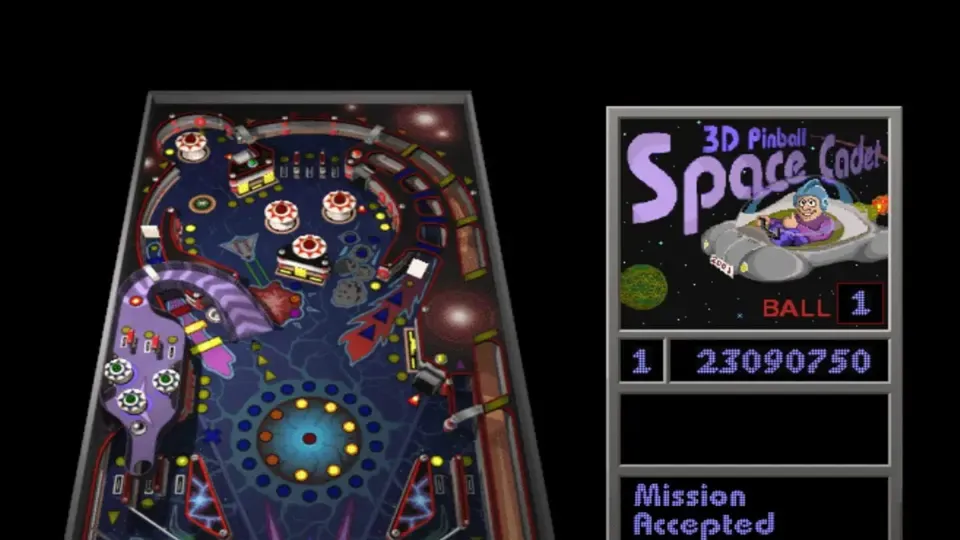
3D Pinball for Windows: Space Cadet, the game that came with Windows XP, has been fully decompiled by fans. You can play it in your browser at pinball.alula.me with nothing to install, or run native builds on Windows 10/11, Mac and Linux using the original data files. Latest desktop release: 2.1.0, 16 October 2023.
This site is not affiliated with Microsoft, Maxis or the porters. We do not host any files; Play opens the porter’s own site in a new tab.
What it is
Space Cadet was one of three tables in Full Tilt! Pinball (1995, by Cinematronics and Maxis). Microsoft bundled it with Windows NT 4.0, 2000, ME and XP as 3D Pinball for Windows, and dropped it from Windows Vista onwards. Microsoft developer Raymond Chen later wrote that the 64-bit port had a collision-detection bug the team could not fix in time, so the game was cut.
In 2021 a developer known as k4zmu2a published a decompilation: every function of Windows XP’s pinball.exe turned back into compilable C++ using Ghidra and IDA, with Microsoft’s own public debug symbols as a guide (SpaceCadetPinball README). It was cross-checked against the 32-bit CADET.EXE from Full Tilt! Pinball. Because the result is portable C++ on SDL2, it now runs on modern Windows, macOS and Linux, and fans have taken it much further.
One of those fans, alula, compiled it to WebAssembly with Emscripten (alula/SpaceCadetPinball). That browser port is the easiest way to play today.
Current status
- Browser: pinball.alula.me is up. We opened it on 3 November 2026 and the table, score panel and menus loaded straight away, with nothing to upload.
- Desktop: release 2.1.0, 16 October 2023, for Windows x64, x86, a Windows XP build and macOS. Linux users can install it from Flathub or their distribution. The repository was last updated in August 2024; the game is considered complete.
- Consoles and other systems: fan ports to Switch, Wii, Wii U, 3DS, DS, PS2, PS Vita, Dreamcast, webOS TVs, MorphOS and AmigaOS 4 are listed in the README. Two Android ports are marked as work in progress.
What you need
- For the browser version: a desktop browser and a keyboard. Phones are untested; the game is built for keyboard controls.
- For the Windows, Mac and Linux builds: the original resource files, which the project does not include. The README says to place the program “into a folder containing original game resources” and that it “supports data files from Windows and Full Tilt versions of the game”. They come from the
Pinballfolder of a Windows XP installation or from a Full Tilt! Pinball disc.
We do not host or link the original data files.
How to play
- Open pinball.alula.me (Play button above). It opens in a new tab.
- Click the table so it has keyboard focus, then press F2 for a new game.
- Hold and release the space bar to launch the ball.
- Use Z for the left flipper and / for the right flipper. X, . and ↑ nudge the table; nudge too hard and it tilts.
For the desktop version: download the build for your system from the releases page, unpack it, copy the original data files into the same folder, and run it. All keys can be changed under Options > Player Controls.
What the decompiled version adds
- Runs natively on modern 64-bit Windows, Mac and Linux.
- Resizable window and modern rendering through SDL2.
- Full Tilt! data support, including the Full Tilt version of the table’s art and sounds.
- Open source (MIT), which is why it has spread to so many platforms.
Common problems
- Desktop build will not start or reports missing data: the data files are missing or in the wrong folder. They must sit next to the program.
- Keys do nothing in the browser: click inside the game first so it gets keyboard focus.
FAQ
Can I play 3D Pinball Space Cadet online?
Yes. pinball.alula.me runs a browser port of the fan decompilation. It opens in a desktop browser tab with nothing to install, and we loaded the table there on 3 November 2026. It is an unofficial fan site, not Microsoft.
How do I get Space Cadet Pinball on Windows 10 or 11?
Windows stopped including it after XP. The decompiled version on GitHub runs natively on 64-bit Windows, but you need to put the original game's data files (from Windows XP's Pinball folder or Full Tilt! Pinball) in the same folder. Or use the browser version.
What are the controls in 3D Pinball?
In the original defaults, Z is the left flipper, the slash key (/) is the right flipper, the space bar pulls the plunger, X, full stop and the up arrow bump the table, and F2 starts a new game. You can remap them under Options.
Is this the real Space Cadet game?
The code is a decompilation, rebuilt by hand from Windows XP's pinball.exe and the Full Tilt! Pinball executable, so it plays like the original. The graphics and sounds are the original files.
Does Space Cadet Pinball work on Mac and Linux?
Yes. The project builds natively for macOS and Linux, there is a Flathub package and a Homebrew tap, and the V2.1.0 release includes a Mac download. You still need the original data files for these builds.
Is there Space Cadet Pinball for Switch or other consoles?
Fans have ported the decompilation to Nintendo Switch, Wii, Wii U, 3DS and DS, PlayStation 2 and Vita, Dreamcast, webOS TVs, MorphOS and AmigaOS 4. The project README lists them; most are homebrew.
Unofficial. This page is written by an independent directory. It is not made by, endorsed by or affiliated with Microsoft (table by Maxis / Cinematronics) or k4zmu2a (decompilation); alula (browser port) (Space Cadet Pinball (decompilation, browser and PC versions)'s author). We do not host any files, and we never link to game files, ROMs or ISOs.
Sources
This page was last updated on Nov 3, 2026. A date after a source is the day we read it. Versions and steps follow the official project; if they differ, the official source wins.
- k4zmu2a/SpaceCadetPinball README (reverse engineering of 3D Pinball, original resources not included, Windows and Full Tilt data, known source ports; checked 2026-11-03)
- GitHub API: SpaceCadetPinball repository (created 29 January 2021, about 4,760 stars, MIT, last push 21 August 2024; checked 2026-11-03)
- SpaceCadetPinball V2.1.0 release, 16 October 2023 (Windows x64, x86, XP and Mac files)
- alula/SpaceCadetPinball: Emscripten (browser) port of the decompilation (MIT, last push 31 July 2025; checked 2026-11-03)
- pinball.alula.me, the browser version (opened by us on 2026-11-03)
- Space Cadet Pinball on Flathub
More ports
More browser game ports you can play in a tab, the newest ports added this week, or the full list of ported games.