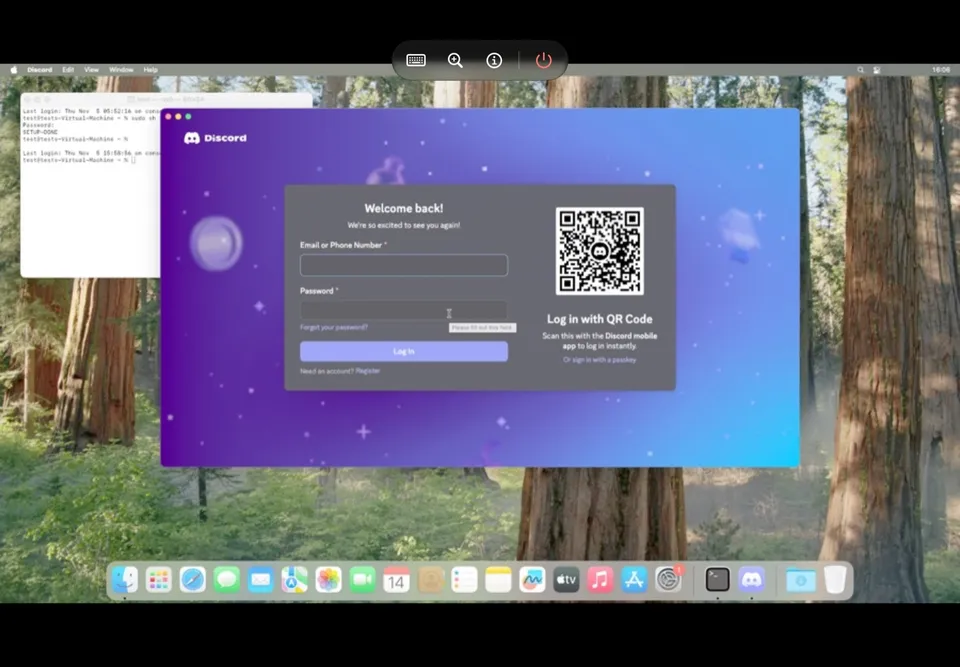
Short answer
Henge runs macOS on an iPhone or iPad by emulating a Mac. It is by Leviidev, who also makes Husk, and version 0.1 came out on 6 November 2026. You sideload it, it needs JIT, and it downloads macOS from Apple during setup. Its README says it has been tested on few devices. We have not tested it ourselves.
The project had about 540 stars on 7 November 2026. Its README says an iPhone 17 Pro reaches the macOS lock screen in about 15 seconds, and that Discord installs and runs.
How it works
iOS gives apps no hypervisor, so Henge runs the Mac’s arm64 code through its own JIT, with its own memory management and devices. macOS draws through a virtual GPU, and Henge replays that with Metal. The screen works as a trackpad, and a keyboard and mouse work on iPad.
What you need
- iOS or iPadOS 17 or later on an A14 or M1 chip or newer.
- A sideloading tool: SideStore or AltStore for
Henge.ipa, or TrollStore forHenge.tipa. - JIT, through one of the options the README lists.
- About 43 GB free for macOS Sequoia 15.6.1, the tested version.
Download it only from the official releases page.
Known limits
From the README:
- Signing in to an Apple Account inside macOS fails.
- Graphics are tested on macOS’s own apps, Chrome, Firefox, VS Code and Discord. Other apps may draw wrongly.
- Only one Mac can start per launch.
- It is emulation, so it is slower than a real Mac.
Is it safe and legal?
Henge is open source under GPL-2.0-or-later and is not affiliated with Apple. It downloads macOS from Apple rather than shipping it, but Apple’s licence for macOS covers Apple hardware, so running it this way is your own call. We have not audited the app.
For Android apps and games on iPhone, see Husk.
FAQ
What is Henge?
An unofficial iPhone and iPad app by Leviidev, the maker of Husk, that emulates a Mac and installs macOS on the device. It runs the Mac's arm64 code through its own JIT, without QEMU or Apple's Virtualization framework.
Which devices does Henge support?
iOS or iPadOS 17 or later on an A14 or M1 chip or newer. The README says it has been tested on few devices so far, and it needs JIT.
Where does Henge get macOS?
It downloads Apple's own restore image during setup and restores it the way a Mac does. The README says nothing is decrypted or patched. macOS stays Apple's software.
How much space does Henge need?
About 43 GB for macOS Sequoia, 17 GB of which is the download you can delete afterwards. A Mac gets 4, 6 or 8 GB of memory.
Can I sign in to my Apple Account in Henge?
Not yet. The README lists signing in to an Apple Account inside macOS as failing with a verification error.
Is Henge on the App Store?
No. The project says its GPL licensing means it cannot go on the App Store. You sideload it.
Unofficial. This page is written by an independent directory. It is not made by, endorsed by or affiliated with Apple or Leviidev (Henge (macOS on iPhone and iPad)'s author). We do not host any files, and we never link to game files, ROMs or ISOs.
Sources
This page was last updated on Nov 11, 2026. A date after a source is the day we read it. Versions and steps follow the official project; if they differ, the official source wins.
More ports
More mod platforms and private servers, or the full list of ported games.